Using Zoom Phone
You can setup "Automatic Zoom Phone Uploads" to FinMate, or "Manually Upload Zoom Phone Conversations" to FinMate. See the directions below. Be sure to Press the "Record" Button during your conversation.
Zoom Phone is not part of FinMate's Calendar Auto Scheduling.
How to Record
In the Zoom Phone App, during your Zoom Phone Call, Press Record to record the phone conversation.
 Zoom Phone App
Automatic Zoom Phone Uploads
Recorded Zoom Phone conversations can automatically be sent to FinMate AI for processing.
All you have to do is make sure Zoom Phone is enabled like below.

Manually Upload Zoom Phone Conversations
Recorded Zoom Phone conversations can be manually downloaded from Zoom Phone, and uploaded to FinMate AI.
In the Zoom Phone App, if you've already recorded a phone call, you can go to Phone Call History(shown on the left side), right click the menu(...) and select "Download". Then you can upload the audio file to Finmate https://app.finmate.ai
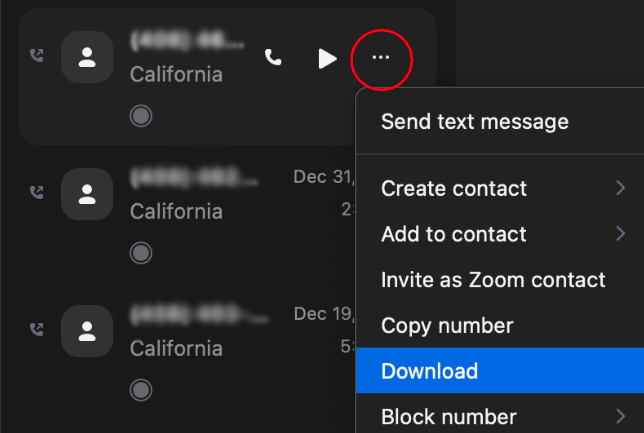 Zoom Phone App - Call History